Compare commits
5 Commits
| Author | SHA1 | Date | |
|---|---|---|---|
 Manuel Vögele Manuel Vögele
|
a5de9bbf0a | ||
|
Manuel Vögele
|
15cda2cdbe | ||
|
Manuel Vögele
|
709774b25f | ||
|
Manuel Vögele
|
bb8ac5d1ac | ||
|
Manuel Vögele
|
5177746fbb |
@@ -1,35 +0,0 @@
|
||||
## 1.2.1
|
||||
### Compatiblity
|
||||
- Drag Ruler is now compatible with Hex Token Size Support. For compatibility Hex Token Size Support Version 0.5.4 or higher is required. Thanks to Ourobor for helping making this possible.
|
||||
|
||||
## 1.2.0
|
||||
### New features
|
||||
- Right click and spacebar can now be swapped, allowing to place waypoints with right click and removing them with spacebar
|
||||
- The module can now be configured use a fixed color instead of the player color for the first speed range
|
||||
- On gridless maps the ruler will now change it's color to indicate the different speed ranges
|
||||
- As an alternative to right click (or spacebar, if you have swapped right and spacebar behavior) waypoints can now also be deleted with the `X` key
|
||||
|
||||
### Bugfixes
|
||||
- Disabling snap to grid with shift now works as expected
|
||||
- Fixed a bug where the ruler would sometimes jump to a different target location when deleting a waypoint
|
||||
|
||||
## 1.1.1
|
||||
### Bugfixes
|
||||
- Fixed a bug where tokens wouldn't be moved to the corect end position on gridless maps
|
||||
- Ruler now appears immediately when the token is being dragged
|
||||
- On gridless maps the ruler will always start measuring at the center of the token
|
||||
- This change has no impact on the distance that is being measured
|
||||
- In addition to the cosmetical aspect this also fixes a bug that allowed players to glitch through walls
|
||||
|
||||
## 1.1.0
|
||||
### New features
|
||||
- The drag ruler will now be colored for other players than the dragging player as well (only if they have at least observer permissions for that token)
|
||||
- The drag ruler won't be shown to other players if they cannot see the dragged token
|
||||
|
||||
### Bugfixes
|
||||
- Fixed a bug where Drag Ruler wouldn't work at all on some windows installations (specificially where the `foundry.js` has `CRLF` line endings)
|
||||
|
||||
## 1.0.1
|
||||
### Bugfixes
|
||||
- The GM can now move tokens through walls
|
||||
- It is now possible to move multiple tokens with Drag Ruler enabled
|
||||
@@ -1,88 +0,0 @@
|
||||
[](https://ko-fi.com/staebchenfisch)
|
||||
|
||||
# Drag Ruler
|
||||
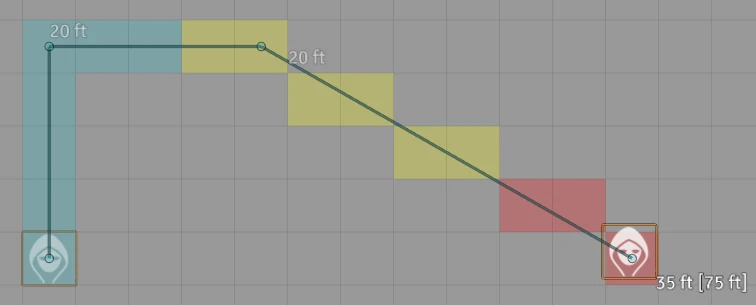
This module shows a ruler when you drag a token to infrom you how far you've dragged the token from it's start point. Additionally, if you're using a grid, the spaces the token will travel though will be colored depending on your tokens speed. If you're using a gridless map the ruler color will change to convey this information.
|
||||
|
||||
|
||||
## Path color
|
||||

|
||||
|
||||
The token has a speed of 30ft. All squares on the path within that range are colored in the players color. If the token is running it can cover double that range (this can be changed in the settings). All Squares on the path that can only be reached while running are colored in yellow. Squares on the path that the token cannot possibly reached at regular speeds are colored red. This coloring behavior can be tweaked in the settings and can be overridden by modules and game systems to provide more granular, game system specific control. For more information on how to do this see the [API](#api) section of this document.
|
||||
|
||||
|
||||
## Waypoints
|
||||
You can add waypoints to the path by pressing spacebar while you drag the token. To remove a placed waypoint press the right mouse button.
|
||||
|
||||
|
||||
|
||||
|
||||
## Why would I want to use this instead of ShowDragDistance?
|
||||
ShowDragDistance isn't maintained anymore. This means that it is at risk to stop working with every foundry update. In fact this process has already begun. As of Foundry Version 0.7.9 ShowDragDistance doesn't work anymore on gridless maps. Drag Ruler on the other hand is fully compatible with the current Foundry release and I'll continue updating it for future foundry releases for the forseeable future.
|
||||
|
||||
In addition Drag Ruler provides more flexibility for game systems and modules via it's api to provide an experience that fits the rules of the game system that you are playing best.
|
||||
|
||||
|
||||
## Game systems with Drag Ruler integration
|
||||
Drag Ruler will work with all Foundry VTT game systems. However some game systems offer a special integration via the [Drag Ruler API](#api), that allows Drag Ruler to take the rules of the game system into account when dispaying speeds (such as weight carried or conditions that apply to the character), offering a smoother experience. While some game systems offer this integration natively, for other game systems there are modules providing the integration. If the integration is provided via a module you need to install and activate both Drag Ruler and the integration module to benefit from the integration.
|
||||
|
||||
The game systems that offer Drag Ruler integration are:
|
||||
- Pathfinder 1 (starting with version 0.77.3)
|
||||
- Pathfinder 2e (via the module [PF2E Drag Ruler Integration](https://foundryvtt.com/packages/pf2e-dragruler/))
|
||||
|
||||
|
||||
## API
|
||||
*Audience: This paragraph is intended for module and system devleopers that want to add more complex behavior to Drag Ruler. If you just want to use this plugins features skip this paragraph.*
|
||||
|
||||
The path coloring behavior of Drag Ruler can be altered by modules and systems to allow for for more complex coloring than provided by default. This allows specifying custom colors, using more different colors than offered by default and performing more calculations for determining the colors (for example a token may only be allowd to run if it isn't waring armor). Doing so is simple. This paragraph gives a short introduction on how to accomplish this, followed by a full example of how a call to the api might look like.
|
||||
|
||||
### Registering your Module/System
|
||||
*This section is written from the perspective of a module developer. If you're writing a game system the process is exactly the same, except that you need to invoke `registerSystem` instead of `registerModule` and need to use the id of your system instead of a module id.*
|
||||
|
||||
The first thing you'll have to do is to make your module known to Drag Ruler. To do this, you have to call the `dragRuler.registerModule` function after the `dragRuler.ready` hook has fired. This might look like this:
|
||||
|
||||
```javascript
|
||||
Hooks.once("dragRuler.ready", () => {
|
||||
dragRuler.registerModule("id-of-your-module", mySpeedProvider)
|
||||
})
|
||||
```
|
||||
|
||||
The function `registerModule` takes two parameters: The first parameter must be the ID of your module as specified in your manifest. The second parameter is a reference to the Speed Provider of your module. What that Speed Provider looks like will be detailed in the paragraph [Writing the Speed Provider](#writing-the-speed-provider)
|
||||
|
||||
### Writing the Speed Provider
|
||||
The Speed Provider is a function that calculates the speeds that a token can reach and assigns a color to each of the speeds. That function receives two arguments. The first argument is the token for which the speed should be calculated. The second argument is the color of the player that is dragging the token.
|
||||
|
||||
The function should contain an array of objects in the format `{range: Integer, color: Integer}`. The range indicates a distance that the token can cover with a certain speed and the color indicates which color should be used for that range. Spaces that cannot be reached with any of the speeds provided by this function will be colored in red (`0xFF0000`). The returned array doesn't need to be sorted in any particular order. However the array is not allowe to contain two objects with an identical range, as that results in undefined behavior.
|
||||
|
||||
The Speed Provider will be called once for each square that will be colored. For this reason it is advisable to not perform any expensive calculations in the Speed Provider.
|
||||
|
||||
Here is an example of how a Speed Provider might look like:
|
||||
```javascript
|
||||
function mySpeedProvider(token, playerColor) {
|
||||
const baseSpeed = token.actor.data.speed
|
||||
const ranges = [{range: baseSpeed, color: playerColor}, {range: baseSpeed * 2, color: 0xFFFF00}]
|
||||
if (!token.actor.data.isWearingArmor) {
|
||||
ranges.push({range: baseSpeed * 3, color: 0xFF8000})
|
||||
}
|
||||
return ranges
|
||||
}
|
||||
```
|
||||
|
||||
With this speed provider, the fields reachable with the token's base speed will be colored in the color of the player that is dragging the token. Each token is able to dash, which allows it to run twice it's base speed. Spaces that are reachable by dashing will be colored yellow (`0xFFFF00`). If the token isn't wearing any armor it is also allowed to sprint, allowing it to cover a distance of 3 times it's base speed. Those squares will be colored in orange (`0xFF8000`). All spaces further away from the token will be colored in red. Tokens wearing armor aren't allowed to sprint and for them all spaces that exceed 2 times their base speed will be colored red.
|
||||
|
||||
### Full example
|
||||
This is a full example of how using the api might look like. It's built from the examples above. For a explanation to what is going on refer to the previous chapters.
|
||||
|
||||
```javascript
|
||||
Hooks.once("dragRuler.ready", () => {
|
||||
dragRuler.registerModule("id-of-your-module", mySpeedProvider)
|
||||
})
|
||||
|
||||
function mySpeedProvider(token, playerColor) {
|
||||
const baseSpeed = token.actor.data.speed
|
||||
const ranges = [{range: baseSpeed, color: playerColor}, {range: baseSpeed * 2, color: 0xFFFF00}]
|
||||
if (!token.actor.data.isWearingArmor) {
|
||||
ranges.push({range: baseSpeed * 3, color: 0xFF8000})
|
||||
}
|
||||
return ranges
|
||||
}
|
||||
```
|
||||
@@ -1,10 +1,6 @@
|
||||
{
|
||||
"drag-ruler": {
|
||||
"settings": {
|
||||
"alwaysShowSpeedForPCs": {
|
||||
"name": "Show PC speed to everyone",
|
||||
"hint": "If enabled the coloring based on actor speed for player characters will shown to everyone, even if they don't have observer permission for the character sheet."
|
||||
},
|
||||
"dashMultiplier": {
|
||||
"name": "Dash Multiplier",
|
||||
"hint": "This can be used to give tokens a secondary speed during coloring of the measured path. Set it to 0 to disable the secondary speed."
|
||||
@@ -21,14 +17,6 @@
|
||||
"native": "Drag Ruler",
|
||||
"system": "System"
|
||||
}
|
||||
},
|
||||
"staticFirstColor": {
|
||||
"name": "Static First Color",
|
||||
"hint": "Use a static color for the first movement range instead of the player color"
|
||||
},
|
||||
"swapSpacebarRightClick": {
|
||||
"name": "Swap spacebar and right click",
|
||||
"hint": "Swaps the functions of spacebar and right click during dragging. If enabled right click will place waypoints and spacebar will delete them"
|
||||
}
|
||||
}
|
||||
}
|
||||
|
||||

|
After Width: | Height: | Size: 689 KiB |

|
After Width: | Height: | Size: 1.1 MiB |

|
After Width: | Height: | Size: 775 KiB |

|
After Width: | Height: | Size: 1.4 MiB |

|
After Width: | Height: | Size: 1.8 MiB |

|
After Width: | Height: | Size: 603 KiB |

|
After Width: | Height: | Size: 503 KiB |

|
After Width: | Height: | Size: 2.0 MiB |

|
After Width: | Height: | Size: 1.1 MiB |
@@ -2,7 +2,7 @@
|
||||
"name": "drag-ruler",
|
||||
"title": "Drag Ruler",
|
||||
"description": "When dragging a token displays a ruler showing how far you've moved that token.",
|
||||
"version": "1.2.1",
|
||||
"version": "0.0.1",
|
||||
"minimumCoreVersion" : "0.7.9",
|
||||
"compatibleCoreVersion" : "0.7.9",
|
||||
"authors": [
|
||||
@@ -23,9 +23,8 @@
|
||||
}
|
||||
],
|
||||
"url": "https://github.com/manuelVo/foundryvtt-drag-ruler",
|
||||
"download": "https://github.com/manuelVo/foundryvtt-drag-ruler/archive/v1.2.1.zip",
|
||||
"download": "https://github.com/manuelVo/foundryvtt-drag-ruler/archive/master.zip",
|
||||
"manifest": "https://raw.githubusercontent.com/manuelVo/foundryvtt-drag-ruler/master/module.json",
|
||||
"readme": "https://github.com/manuelVo/foundryvtt-drag-ruler/blob/master/README.md",
|
||||
"changelog": "https://github.com/manuelVo/foundryvtt-drag-ruler/blob/master/CHANGELOG.md",
|
||||
"bugs": "https://github.com/manuelVo/foundryvtt-drag-ruler/issues"
|
||||
}
|
||||
|
||||
@@ -1,19 +0,0 @@
|
||||
export function getHexSizeSupportTokenGridCenter(token) {
|
||||
const tokenCenterOffset = CONFIG.hexSizeSupport.getCenterOffset(token)
|
||||
const tokenCenter = {x: token.x + tokenCenterOffset.x, y: token.y + tokenCenterOffset.y}
|
||||
if (token.getFlag("hex-size-support", "borderSize") % 2 === 1)
|
||||
return tokenCenter
|
||||
if (canvas.grid.grid.columns) {
|
||||
let hexOffset = canvas.grid.w / 2
|
||||
if (!CONFIG.hexSizeSupport.getAltOrientationFlag(token))
|
||||
hexOffset *= -1
|
||||
tokenCenter.x += hexOffset
|
||||
}
|
||||
else {
|
||||
let hexOffset = canvas.grid.h / 2
|
||||
if (CONFIG.hexSizeSupport.getAltOrientationFlag(token))
|
||||
hexOffset *= -1
|
||||
tokenCenter.y += hexOffset
|
||||
}
|
||||
return tokenCenter
|
||||
}
|
||||
@@ -1,179 +0,0 @@
|
||||
import {getColorForDistance} from "./main.js"
|
||||
|
||||
// This is a modified version of Ruler.moveToken from foundry 0.7.9
|
||||
export async function moveTokens(draggedToken, selectedTokens) {
|
||||
let wasPaused = game.paused;
|
||||
if (wasPaused && !game.user.isGM) {
|
||||
ui.notifications.warn(game.i18n.localize("GAME.PausedWarning"));
|
||||
return false;
|
||||
}
|
||||
if (!this.visible || !this.destination) return false;
|
||||
if (!draggedToken) return;
|
||||
|
||||
// Get the movement rays and check collision along each Ray
|
||||
// These rays are center-to-center for the purposes of collision checking
|
||||
const rays = this._getRaysFromWaypoints(this.waypoints, this.destination);
|
||||
if (!game.user.isGM) {
|
||||
const hasCollision = selectedTokens.some(token => {
|
||||
const offset = calculateTokenOffset(token, draggedToken)
|
||||
const offsetRays = rays.map(ray => applyOffsetToRay(ray, offset))
|
||||
return offsetRays.some(r => canvas.walls.checkCollision(r));
|
||||
})
|
||||
if (hasCollision) {
|
||||
ui.notifications.error(game.i18n.localize("ERROR.TokenCollide"));
|
||||
this._endMeasurement();
|
||||
return true;
|
||||
}
|
||||
}
|
||||
|
||||
// Execute the movement path.
|
||||
// Transform each center-to-center ray into a top-left to top-left ray using the prior token offsets.
|
||||
this._state = Ruler.STATES.MOVING;
|
||||
await Promise.all(selectedTokens.map(token => {
|
||||
// Return the promise so we can wait for it outside the loop
|
||||
const offset = calculateTokenOffset(token, draggedToken)
|
||||
return animateToken.call(this, token, rays, offset, wasPaused)
|
||||
}))
|
||||
|
||||
// Once all animations are complete we can clear the ruler
|
||||
this._endMeasurement();
|
||||
}
|
||||
|
||||
// This is a modified version code extracted from Ruler.moveToken from foundry 0.7.9
|
||||
async function animateToken(token, rays, tokenOffset, wasPaused) {
|
||||
const offsetRays = rays.map(ray => applyOffsetToRay(ray, tokenOffset))
|
||||
|
||||
// Determine offset relative to the Token top-left.
|
||||
// This is important so we can position the token relative to the ruler origin for non-1x1 tokens.
|
||||
const origin = [this.waypoints[0].x + tokenOffset.x, this.waypoints[0].y + tokenOffset.y]
|
||||
let dx, dy
|
||||
if (canvas.grid.type === CONST.GRID_TYPES.GRIDLESS) {
|
||||
dx = token.data.x - origin[0]
|
||||
dy = token.data.y - origin[1]
|
||||
}
|
||||
else {
|
||||
dx = token.data.x - origin[0]
|
||||
dy = token.data.y - origin[1]
|
||||
}
|
||||
|
||||
token._noAnimate = true;
|
||||
for (let r of offsetRays) {
|
||||
if (!wasPaused && game.paused) break;
|
||||
const dest = [r.B.x, r.B.y];
|
||||
const path = new Ray({ x: token.x, y: token.y }, { x: dest[0] + dx, y: dest[1] + dy });
|
||||
await token.update(path.B);
|
||||
await token.animateMovement(path);
|
||||
}
|
||||
token._noAnimate = false;
|
||||
}
|
||||
|
||||
function calculateTokenOffset(tokenA, tokenB) {
|
||||
return {x: tokenA.data.x - tokenB.data.x, y: tokenA.data.y - tokenB.data.y}
|
||||
}
|
||||
|
||||
function applyOffsetToRay(ray, offset) {
|
||||
return new Ray({x: ray.A.x + offset.x, y: ray.A.y + offset.y}, {x: ray.B.x + offset.x, y: ray.B.y + offset.y})
|
||||
}
|
||||
|
||||
// This is a modified version of Ruler._onMouseMove from foundry 0.7.9
|
||||
export function onMouseMove(event) {
|
||||
if (this._state === Ruler.STATES.MOVING) return;
|
||||
|
||||
// Extract event data
|
||||
const mt = event._measureTime || 0;
|
||||
const originalEvent = event.data.originalEvent;
|
||||
const destination = {x: event.data.destination.x + this.rulerOffset.x, y: event.data.destination.y + this.rulerOffset.y}
|
||||
|
||||
// Hide any existing Token HUD
|
||||
canvas.hud.token.clear();
|
||||
delete event.data.hudState;
|
||||
|
||||
// Draw measurement updates
|
||||
if (Date.now() - mt > 50) {
|
||||
this.measure(destination, {snap: !originalEvent.shiftKey});
|
||||
event._measureTime = Date.now();
|
||||
this._state = Ruler.STATES.MEASURING;
|
||||
}
|
||||
}
|
||||
|
||||
// This is a modified version of Ruler.measure form foundry 0.7.9
|
||||
export function measure(destination, {gridSpaces=true, snap=false} = {}) {
|
||||
if (this.isDragRuler && !this.draggedToken.isVisible)
|
||||
return []
|
||||
|
||||
if (snap)
|
||||
destination = new PIXI.Point(...canvas.grid.getCenter(destination.x, destination.y));
|
||||
const waypoints = this.waypoints.concat([destination]);
|
||||
const centeredWaypoints = waypoints.map(w => new PIXI.Point(...canvas.grid.getCenter(w.x, w.y)))
|
||||
const r = this.ruler;
|
||||
this.destination = destination;
|
||||
|
||||
// Iterate over waypoints and construct segment rays
|
||||
const segments = [];
|
||||
const centeredSegments = []
|
||||
for (let [i, dest] of waypoints.slice(1).entries()) {
|
||||
const centeredDest = centeredWaypoints[i + 1]
|
||||
const origin = waypoints[i];
|
||||
const centeredOrigin = centeredWaypoints[i]
|
||||
const label = this.labels.children[i];
|
||||
const ray = new Ray(origin, dest);
|
||||
const centeredRay = new Ray(centeredOrigin, centeredDest)
|
||||
if (ray.distance < 10) {
|
||||
if (label) label.visible = false;
|
||||
continue;
|
||||
}
|
||||
segments.push({ ray, label });
|
||||
centeredSegments.push({ray: centeredRay, label})
|
||||
}
|
||||
|
||||
// Compute measured distance
|
||||
const distances = canvas.grid.measureDistances(centeredSegments, { gridSpaces });
|
||||
let totalDistance = 0;
|
||||
for (let [i, d] of distances.entries()) {
|
||||
let s = segments[i];
|
||||
s.startDistance = totalDistance
|
||||
totalDistance += d;
|
||||
s.last = i === (segments.length - 1);
|
||||
s.distance = d;
|
||||
s.text = this._getSegmentLabel(d, totalDistance, s.last);
|
||||
}
|
||||
|
||||
// Clear the grid highlight layer
|
||||
const hlt = canvas.grid.highlightLayers[this.name] || canvas.grid.addHighlightLayer(this.name);
|
||||
hlt.clear();
|
||||
|
||||
// Draw measured path
|
||||
r.clear();
|
||||
let rulerColor
|
||||
if (canvas.grid.type === CONST.GRID_TYPES.GRIDLESS)
|
||||
rulerColor = getColorForDistance.call(this, totalDistance)
|
||||
else
|
||||
rulerColor = this.color
|
||||
for (let s of segments) {
|
||||
const { ray, label, text, last } = s;
|
||||
|
||||
// Draw line segment
|
||||
r.lineStyle(6, 0x000000, 0.5).moveTo(ray.A.x, ray.A.y).lineTo(ray.B.x, ray.B.y)
|
||||
.lineStyle(4, rulerColor, 0.25).moveTo(ray.A.x, ray.A.y).lineTo(ray.B.x, ray.B.y);
|
||||
|
||||
// Draw the distance label just after the endpoint of the segment
|
||||
if (label) {
|
||||
label.text = text;
|
||||
label.alpha = last ? 1.0 : 0.5;
|
||||
label.visible = true;
|
||||
let labelPosition = ray.project((ray.distance + 50) / ray.distance);
|
||||
label.position.set(labelPosition.x, labelPosition.y);
|
||||
}
|
||||
|
||||
// Highlight grid positions
|
||||
this._highlightMeasurement(ray, s.startDistance);
|
||||
}
|
||||
|
||||
// Draw endpoints
|
||||
for (let p of waypoints) {
|
||||
r.lineStyle(2, 0x000000, 0.5).beginFill(rulerColor, 0.25).drawCircle(p.x, p.y, 8);
|
||||
}
|
||||
|
||||
// Return the measured segments
|
||||
return segments;
|
||||
}
|
||||
@@ -1,15 +1,13 @@
|
||||
"use strict"
|
||||
|
||||
import {availableSpeedProviders, currentSpeedProvider, registerModule, registerSystem, setCurrentSpeedProvider} from "./api.js"
|
||||
import {getHexSizeSupportTokenGridCenter} from "./compatibility.js"
|
||||
import {measure, moveTokens, onMouseMove} from "./foundry_imports.js"
|
||||
import {registerSettings, settingsKey} from "./settings.js"
|
||||
|
||||
Hooks.once("init", () => {
|
||||
registerSettings()
|
||||
hookTokenDragHandlers()
|
||||
hookRulerFunctions()
|
||||
hookKeyboardManagerFunctions()
|
||||
hookRulerHandlers()
|
||||
patchRulerMeasure()
|
||||
patchRulerHighlightMeasurement()
|
||||
|
||||
availableSpeedProviders["native"] = nativeSpeedProvider
|
||||
@@ -28,13 +26,11 @@ Hooks.once("ready", () => {
|
||||
})
|
||||
|
||||
Hooks.on("canvasReady", () => {
|
||||
canvas.controls.rulers.children.forEach(ruler => {
|
||||
ruler.draggedToken = null
|
||||
Object.defineProperty(ruler, "isDragRuler", {
|
||||
get: function isDragRuler() {
|
||||
return Boolean(this.draggedToken) // If draggedToken is set this is a drag ruler
|
||||
}
|
||||
})
|
||||
canvas.controls.ruler.draggedToken = null
|
||||
Object.defineProperty(canvas.controls.ruler, "isDragRuler", {
|
||||
get: function isDragRuler() {
|
||||
return Boolean(this.draggedToken) // If draggedToken is set this is a drag ruler
|
||||
}
|
||||
})
|
||||
})
|
||||
|
||||
@@ -66,7 +62,7 @@ function hookTokenDragHandlers() {
|
||||
}
|
||||
}
|
||||
|
||||
function hookRulerFunctions() {
|
||||
function hookRulerHandlers() {
|
||||
const originalMoveTokenHandler = Ruler.prototype.moveToken
|
||||
Ruler.prototype.moveToken = function (event) {
|
||||
const eventHandled = onRulerMoveToken.call(this, event)
|
||||
@@ -74,173 +70,66 @@ function hookRulerFunctions() {
|
||||
return originalMoveTokenHandler.call(this, event)
|
||||
return true
|
||||
}
|
||||
|
||||
const originalToJSON = Ruler.prototype.toJSON
|
||||
Ruler.prototype.toJSON = function () {
|
||||
const json = originalToJSON.call(this)
|
||||
if (this.draggedToken)
|
||||
json["draggedToken"] = this.draggedToken.data._id
|
||||
return json
|
||||
}
|
||||
|
||||
const originalUpdate = Ruler.prototype.update
|
||||
Ruler.prototype.update = function (data) {
|
||||
if (data.draggedToken) {
|
||||
this.draggedToken = canvas.tokens.get(data.draggedToken)
|
||||
}
|
||||
originalUpdate.call(this, data)
|
||||
}
|
||||
|
||||
const originalMeasure = Ruler.prototype.measure
|
||||
Ruler.prototype.measure = function (destination, options={}) {
|
||||
if (this.isDragRuler) {
|
||||
return measure.call(this, destination, options)
|
||||
}
|
||||
else {
|
||||
return originalMeasure.call(this, destination, options)
|
||||
}
|
||||
}
|
||||
}
|
||||
|
||||
function hookKeyboardManagerFunctions() {
|
||||
const originalHandleKeys = KeyboardManager.prototype._handleKeys
|
||||
KeyboardManager.prototype._handleKeys = function (event, key, up) {
|
||||
const eventHandled = handleKeys.call(this, event, key, up)
|
||||
if (!eventHandled)
|
||||
originalHandleKeys.call(this, event, key, up)
|
||||
}
|
||||
}
|
||||
|
||||
function handleKeys(event, key, up) {
|
||||
if (event.repeat || this.hasFocus)
|
||||
return false
|
||||
|
||||
if (key.toLowerCase() === "x") return onKeyX(up)
|
||||
if (key.toLowerCase() === "shift") return onKeyShift(up)
|
||||
return false
|
||||
}
|
||||
|
||||
function onKeyX(up) {
|
||||
if (up)
|
||||
return false
|
||||
if (!canvas.controls.ruler.isDragRuler)
|
||||
return false
|
||||
|
||||
deleteWaypoint()
|
||||
return true
|
||||
}
|
||||
|
||||
function onKeyShift(up) {
|
||||
const ruler = canvas.controls.ruler
|
||||
if (!ruler.isDragRuler)
|
||||
return false
|
||||
|
||||
const mousePosition = canvas.app.renderer.plugins.interaction.mouse.getLocalPosition(canvas.tokens)
|
||||
const rulerOffset = ruler.rulerOffset
|
||||
const measurePosition = {x: mousePosition.x + rulerOffset.x, y: mousePosition.y + rulerOffset.y}
|
||||
ruler.measure(measurePosition, {snap: up})
|
||||
}
|
||||
|
||||
function onTokenLeftDragStart(event) {
|
||||
const ruler = canvas.controls.ruler
|
||||
ruler.draggedToken = this
|
||||
let tokenCenter
|
||||
if (canvas.grid.isHex && game.modules.get("hex-size-support")?.active && CONFIG.hexSizeSupport.getAltSnappingFlag(this))
|
||||
tokenCenter = getHexSizeSupportTokenGridCenter(this)
|
||||
else
|
||||
tokenCenter = {x: this.x + canvas.grid.grid.w / 2, y: this.y + canvas.grid.grid.h / 2}
|
||||
ruler.clear();
|
||||
ruler._state = Ruler.STATES.STARTING;
|
||||
ruler.rulerOffset = {x: tokenCenter.x - event.data.origin.x, y: tokenCenter.y - event.data.origin.y}
|
||||
addWaypoint.call(ruler, tokenCenter, false)
|
||||
canvas.controls.ruler._onDragStart(event)
|
||||
canvas.controls.ruler.draggedToken = this
|
||||
}
|
||||
|
||||
function onTokenLeftDragMove(event) {
|
||||
const ruler = canvas.controls.ruler
|
||||
if (ruler.isDragRuler)
|
||||
onMouseMove.call(ruler, event)
|
||||
if (canvas.controls.ruler.isDragRuler)
|
||||
canvas.controls.ruler._onMouseMove(event)
|
||||
}
|
||||
|
||||
function onTokenDragLeftDrop(event) {
|
||||
const ruler = canvas.controls.ruler
|
||||
if (!ruler.isDragRuler)
|
||||
if (!canvas.controls.ruler.isDragRuler)
|
||||
return false
|
||||
const selectedTokens = canvas.tokens.placeables.filter(token => token._controlled)
|
||||
moveTokens.call(ruler, ruler.draggedToken, selectedTokens)
|
||||
ruler.draggedToken = null
|
||||
canvas.controls.ruler.draggedToken = null
|
||||
canvas.controls.ruler.moveToken(event)
|
||||
return true
|
||||
}
|
||||
|
||||
function onTokenDragLeftCancel(event) {
|
||||
// This function is invoked by right clicking
|
||||
const ruler = canvas.controls.ruler
|
||||
if (!ruler.isDragRuler)
|
||||
if (!canvas.controls.ruler.isDragRuler)
|
||||
return false
|
||||
if (ruler._state === Ruler.STATES.MEASURING) {
|
||||
if (!game.settings.get(settingsKey, "swapSpacebarRightClick")) {
|
||||
if (ruler.waypoints.length > 1)
|
||||
event.preventDefault()
|
||||
deleteWaypoint()
|
||||
if (canvas.controls.ruler._state === Ruler.STATES.MEASURING) {
|
||||
if (canvas.controls.ruler.waypoints.length > 1) {
|
||||
canvas.controls.ruler._removeWaypoint(canvas.app.renderer.plugins.interaction.mouse.getLocalPosition(canvas.tokens), {snap: !event.shiftKey})
|
||||
game.user.broadcastActivity({ruler: canvas.controls.ruler})
|
||||
event.preventDefault()
|
||||
}
|
||||
else {
|
||||
event.preventDefault()
|
||||
const snap = !event.shiftKey
|
||||
addWaypoint.call(ruler, ruler.destination, snap)
|
||||
canvas.controls.ruler._endMeasurement()
|
||||
canvas.controls.ruler.draggedToken = null
|
||||
return false
|
||||
}
|
||||
}
|
||||
return true
|
||||
}
|
||||
|
||||
function onRulerMoveToken(event) {
|
||||
// This function is invoked by left clicking
|
||||
if (!this.isDragRuler)
|
||||
return false
|
||||
if (!game.settings.get(settingsKey, "swapSpacebarRightClick")) {
|
||||
const snap = !event.shiftKey
|
||||
addWaypoint.call(this, this.destination, snap)
|
||||
}
|
||||
else
|
||||
deleteWaypoint()
|
||||
this._addWaypoint(this.destination)
|
||||
return true
|
||||
}
|
||||
|
||||
function addWaypoint(point, snap=true) {
|
||||
if (snap)
|
||||
point = canvas.grid.getCenter(point.x, point.y);
|
||||
else
|
||||
point = [point.x, point.y]
|
||||
this.waypoints.push(new PIXI.Point(point[0], point[1]));
|
||||
this.labels.addChild(new PreciseText("", CONFIG.canvasTextStyle));
|
||||
}
|
||||
|
||||
function deleteWaypoint() {
|
||||
const ruler = canvas.controls.ruler
|
||||
if (ruler.waypoints.length > 1) {
|
||||
const mousePosition = canvas.app.renderer.plugins.interaction.mouse.getLocalPosition(canvas.tokens)
|
||||
const rulerOffset = ruler.rulerOffset
|
||||
ruler._removeWaypoint({x: mousePosition.x + rulerOffset.x, y: mousePosition.y + rulerOffset.y})
|
||||
game.user.broadcastActivity({ruler: ruler})
|
||||
}
|
||||
else {
|
||||
const token = ruler.draggedToken
|
||||
ruler._endMeasurement()
|
||||
ruler.draggedToken = null
|
||||
|
||||
// Deactivate the drag workflow in mouse
|
||||
token.mouseInteractionManager._deactivateDragEvents();
|
||||
token.mouseInteractionManager.state = token.mouseInteractionManager.states.HOVER;
|
||||
|
||||
// This will cancel the current drag operation
|
||||
// Pass in a fake event that hopefully is enough to allow other modules to function
|
||||
token._onDragLeftCancel({preventDefault: () => {return}})
|
||||
}
|
||||
}
|
||||
|
||||
function strInsertAfter(haystack, needle, strToInsert) {
|
||||
const pos = haystack.indexOf(needle) + needle.length
|
||||
return haystack.slice(0, pos) + strToInsert + haystack.slice(pos)
|
||||
}
|
||||
|
||||
// These patches were written with foundry-0.7.9.js as reference
|
||||
function patchRulerMeasure() {
|
||||
let code = Ruler.prototype.measure.toString()
|
||||
// Remove function signature and closing curly bracket (those are on the first and last line)
|
||||
code = code.slice(code.indexOf("\n"), code.lastIndexOf("\n"))
|
||||
code = strInsertAfter(code, "for ( let [i, d] of distances.entries() ) {\n", "segments[i].startDistance = totalDistance\n")
|
||||
code = strInsertAfter(code, "this._highlightMeasurement(ray", ", s.startDistance")
|
||||
Ruler.prototype.measure = new Function("destination", "{gridSpaces=true}={}", code)
|
||||
}
|
||||
|
||||
function nativeSpeedProvider(token, playercolor) {
|
||||
const speedAttribute = game.settings.get(settingsKey, "speedAttribute")
|
||||
if (!speedAttribute)
|
||||
@@ -256,18 +145,11 @@ function nativeSpeedProvider(token, playercolor) {
|
||||
return [{range: tokenSpeed, color: playercolor}, {range: tokenSpeed * dashMultiplier, color: 0xFFFF00}]
|
||||
}
|
||||
|
||||
export function getColorForDistance(startDistance, subDistance=0) {
|
||||
function getColorForDistance(startDistance, subDistance) {
|
||||
if (!this.isDragRuler)
|
||||
return this.color
|
||||
// Don't apply colors if the current user doesn't have at least observer permissions
|
||||
if (this.draggedToken.actor.permission < 2) {
|
||||
// If this is a pc and alwaysShowSpeedForPCs is enabled we show the color anyway
|
||||
if (!(this.draggedToken.actor.data.type === "character" && game.settings.get(settingsKey, "alwaysShowSpeedForPCs")))
|
||||
return this.color
|
||||
}
|
||||
const distance = startDistance + subDistance
|
||||
const firstColor = game.settings.get(settingsKey, "staticFirstColor") ? 0x00FF00 : this.color
|
||||
const ranges = currentSpeedProvider(this.draggedToken, firstColor)
|
||||
const ranges = currentSpeedProvider(this.draggedToken, this.color)
|
||||
if (ranges.length === 0)
|
||||
return this.color
|
||||
const currentRange = ranges.reduce((minRange, currentRange) => {
|
||||
@@ -281,8 +163,6 @@ export function getColorForDistance(startDistance, subDistance=0) {
|
||||
// These patches were written with foundry-0.7.9.js as reference
|
||||
function patchRulerHighlightMeasurement() {
|
||||
let code = Ruler.prototype._highlightMeasurement.toString()
|
||||
// Replace CRLF with LF in case foundry.js has CRLF for some reason
|
||||
code = code.replace(/\r\n/g, "\n")
|
||||
// Remove function signature and closing curly bracket (those are on the first and last line)
|
||||
code = code.slice(code.indexOf("\n"), code.lastIndexOf("\n"))
|
||||
|
||||
|
||||
@@ -4,24 +4,6 @@ import {getDefaultDashMultiplier, getDefaultSpeedAttribute} from "./systems.js"
|
||||
export const settingsKey = "drag-ruler";
|
||||
|
||||
export function registerSettings() {
|
||||
game.settings.register(settingsKey, "swapSpacebarRightClick", {
|
||||
name: "drag-ruler.settings.swapSpacebarRightClick.name",
|
||||
hint: "drag-ruler.settings.swapSpacebarRightClick.hint",
|
||||
scope: "client",
|
||||
config: true,
|
||||
type: Boolean,
|
||||
default: false,
|
||||
})
|
||||
|
||||
game.settings.register(settingsKey, "alwaysShowSpeedForPCs", {
|
||||
name: "drag-ruler.settings.alwaysShowSpeedForPCs.name",
|
||||
hint: "drag-ruler.settings.alwaysShowSpeedForPCs.hint",
|
||||
scope: "world",
|
||||
config: true,
|
||||
type: Boolean,
|
||||
default: true,
|
||||
})
|
||||
|
||||
// This setting will be modified by the api if modules register to it
|
||||
game.settings.register(settingsKey, "speedProvider", {
|
||||
name: "drag-ruler.settings.speedProvider.name",
|
||||
@@ -53,13 +35,4 @@ export function registerSettings() {
|
||||
type: Number,
|
||||
default: getDefaultDashMultiplier(),
|
||||
})
|
||||
|
||||
game.settings.register(settingsKey, "staticFirstColor", {
|
||||
name: "drag-ruler.settings.staticFirstColor.name",
|
||||
hint: "drag-ruler.settings.staticFirstColor.hint",
|
||||
scope: "world",
|
||||
config: true,
|
||||
type: Boolean,
|
||||
default: false,
|
||||
})
|
||||
}
|
||||
|
||||